TRIGGERcmd
    • Categories
    • Recent
    • Tags
    • Popular
    • Users
    • Groups
    • Search
    • Register
    • Login
    1. Home
    2. Tags
    3. raspberry pi
    Log in to post

    • All categories
    • RussR

      Raspberry Pi image with TRIGGERcmd pre-loaded

      Watching Ignoring Scheduled Pinned Locked Moved Raspberry Pi raspberry pi
      1
      5
      0 Votes
      1 Posts
      1k Views
      No one has replied
    • RussR

      Orange Pi Zero 2 image with TRIGGERcmd agent pre-installed and programmed for IR remote control

      Watching Ignoring Scheduled Pinned Locked Moved Raspberry Pi orange pi raspberry pi panel
      1
      6
      0 Votes
      1 Posts
      2k Views
      No one has replied
    • RussR

      Raspberry Pi network install beta

      Watching Ignoring Scheduled Pinned Locked Moved General Discussion raspberry pi
      1
      0 Votes
      1 Posts
      642 Views
      No one has replied
    • tuicemenT

      Run a HomeGenie macro(script, scene)

      Watching Ignoring Scheduled Pinned Locked Moved Raspberry Pi homegenie alexa google assistan raspberry pi
      1
      0 Votes
      1 Posts
      1k Views
      No one has replied
    • tuicemenT

      Alexa Google Panic Alarm

      Watching Ignoring Scheduled Pinned Locked Moved Raspberry Pi google assistan alexa x10 homegenie raspberry pi
      5
      0 Votes
      5 Posts
      2k Views
      tuicemenT
      Yesterday I did a clean up of my HomeGenie disabling things I thought I no longer needed. After this I tested my Panic Alarm and discovered there were a few things required that I had left out. These may have been set by default with the initial install of HomeGenie. Besides the Demo-Toggle Door having to be enabled the Virtual Modules Demo program must also be enabled. As well the Automation.Demo 2 "DoorSensor" need to have the options to "Use as security sensor" and "Also trigger when armed Home" checked. The Automation.Demo 2 "DoorSensor" has to be in the closed condition prior to arming the security widget or you will need to send 2 panic calls
    • tuicemenT

      Arm/Disarm Security system via Google/Alexa

      Watching Ignoring Scheduled Pinned Locked Moved Raspberry Pi homegenie x10 alexa google assistan raspberry pi
      3
      0 Votes
      3 Posts
      2k Views
      tuicemenT
      Here's the command to arm the HG security system widget to armed home. curl http://HGAddress/api/HomeAutomation.HomeGenie.Automation/90/Control.ArmHome
    • tuicemenT

      Check DuckDNS connection status/update

      Watching Ignoring Scheduled Pinned Locked Moved Raspberry Pi homegenie alexa google assistan raspberry pi
      1
      1 Votes
      1 Posts
      2k Views
      No one has replied
    • tuicemenT

      Say room temperature and humidity

      Watching Ignoring Scheduled Pinned Locked Moved Raspberry Pi raspberry pi alexa google assistan
      9
      0 Votes
      9 Posts
      3k Views
      tuicemenT
      If your like me and find the decimal point in the return a bit confusing you can change the line os.system('~/.TRIGGERcmdData/sendresult.sh ' + 'Temp={0:0.1f} Humidity={1:0.1f}'.format(t,h)) to os.system('~/.TRIGGERcmdData/sendresult.sh ' + 'Temp={0:0.0f} Humidity={1:0.0f}'.format(t,h)) if you wish the return to send a Fahrenheit value instead of Celsius you can add the line t = (t* 1.8) + 32 just after the line #Print Temperature and Humidity on Shell window

    • RussR

      Windows 11 on Raspberry Pi?

      Watching Ignoring Scheduled Pinned Locked Moved General Discussion raspberry pi
      5
      0 Votes
      5 Posts
      1k Views
      tuicemenT
      @russ I've been researching this some what. As my current PC doesn't support Windows 11 (or so it says). There are still some things that need work arounds but hopefully they get worked out for when your 8 gig Pi arrives.
    • tuicemenT

      HomeGenie X10 control with single bash script

      Watching Ignoring Scheduled Pinned Locked Moved Raspberry Pi raspberry pi google assistan alexa homegenie x10
      15
      0 Votes
      15 Posts
      5k Views
      tuicemenT
      @russ thanks, I removed the deviceType from my json file and had Alexa rediscover and they do still dim. I edited my previous post. It should be noted that using dim turns the device to that value. So if you turn a light on (100%) then say dim 20% it doesn't set the light level to 80 but instead sets the light level to 20. At least that's the way it works for HG.
    • RussR

      Control RGB LED bike lights with Raspberry Pi

      Watching Ignoring Scheduled Pinned Locked Moved Raspberry Pi raspberry pi
      1
      0 Votes
      1 Posts
      1k Views
      No one has replied
    • W

      433Mhz remote gate opener with Raspberry Pi

      Watching Ignoring Scheduled Pinned Locked Moved Raspberry Pi 433mhz raspberry pi
      8
      1 Votes
      8 Posts
      8k Views
      W
      @russ Interesting idea... make auto billing possible for registered customers etc...
    • RussR

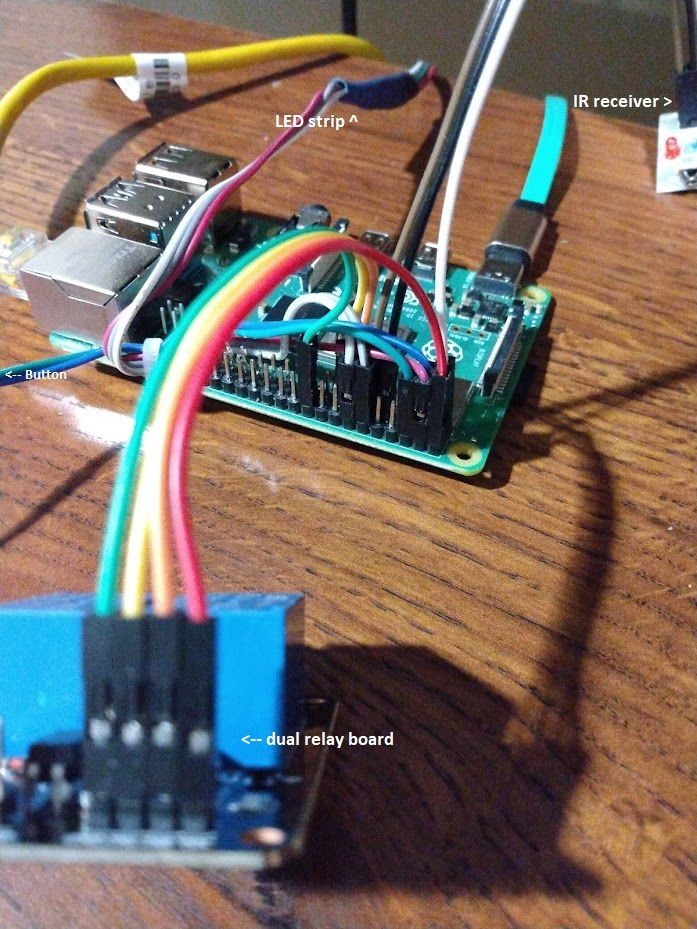
      Raspberry Pi relay wiring photos

      Watching Ignoring Scheduled Pinned Locked Moved Raspberry Pi raspberry pi
      1
      0 Votes
      1 Posts
      1k Views
      No one has replied
    • RussR

      Windows script to prep SD card for Raspberry Pi with TRIGGERcmd agent

      Watching Ignoring Scheduled Pinned Locked Moved Instructions raspberry pi
      4
      0 Votes
      4 Posts
      3k Views
      Dean McNaughtonD
      @Russ I think the batch file wrote info to the card, but can't remember for sure. I'm hesitant to repeat the experiment right now because the SSD card is configured and running Raspberry Pi OS. As far as I'm concerned, this is not an active issue for me anymore because I installed it a different way; I should have followed up to let you know. Thank you for looking into it and responding though!
    • B

      Rpi VLC

      Watching Ignoring Scheduled Pinned Locked Moved General Discussion raspberry pi vlc google home hub chromecast
      5
      0 Votes
      5 Posts
      4k Views
      B
      @russ Thanks I'm away for a week or more, I'll have a crack when I get back.
    • RussR

      Turn on a computer

      Watching Ignoring Scheduled Pinned Locked Moved Raspberry Pi raspberry pi
      16
      0 Votes
      16 Posts
      19k Views
      RussR
      @Wesley-Correa, if you share your computer with another TRIGGERcmd user, all of the commands on that computer are shared. Are you seeing the commands you created in commands.json on the website?
    • RussR

      Raspberry Pi setup

      Watching Ignoring Scheduled Pinned Locked Moved Raspberry Pi raspberry pi
      40
      0 Votes
      40 Posts
      36k Views
      Jorge FuentesJ
      That's brilliant, thank you for the information.